JOPS Integration with Django for Single-Page Applications
JOPS, a framework for building single-page applications (SPAs), now supports integration with Django, allowing developers to embed SPAs directly into Django projects without the need for additional build steps or…

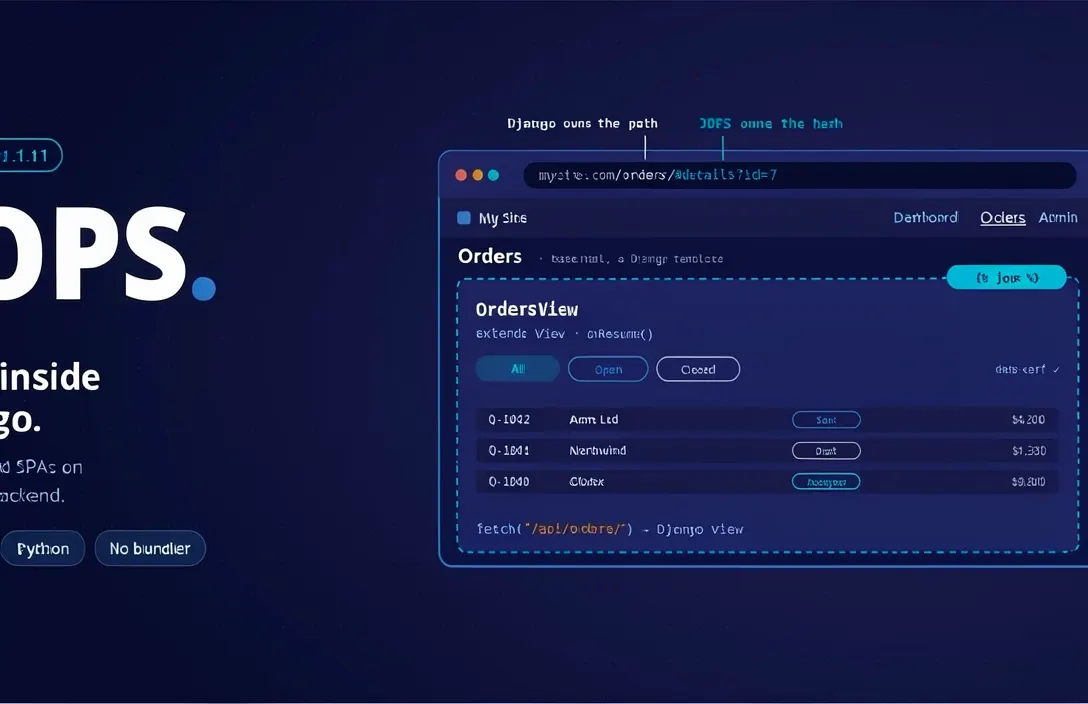

JOPS, a framework for building single-page applications, has now been extended to support integration with Django projects. This integration allows developers to run JOPS SPAs within Django, either as standalone apps or embedded within existing templates. The integration utilizes a new {% jops %} template tag, enabling the inclusion of JOPS applications directly into Django templates (source ID: 1). [1]
With this integration, JOPS SPAs can be initialized within a Django project using the command `npx jops-core init --django`, which generates the necessary files and configuration for the SPA. The generated app includes static files, templates, and URL routes, and can be added to the `INSTALLED_APPS` and `urlpatterns` in the Django project (source ID: 1). [1]
The integration supports both Node.js and Python-based setups, offering flexibility for teams that may not use Node.js. Developers can install the JOPS app using either `npm` or `pip`, and the framework ensures compatibility with Django's existing structures, including CSRF and Content Security Policy (CSP) settings (source ID: 1). [1]
JOPS is now integrated into Django projects, functioning as a single-page application (SPA) that can either operate as its own Django app or be embedded within any Django template using the {% jops %} template tag. This integration allows Django to maintain its role as the backend, handling models, views, APIs, sessions, and the admin interface, while JOPS introduces class-based views with an Android-style lifecycle for the frontend. The JOPS website, launched with version 1.1.10 at jops.ui-db.com, provides comprehensive guides, core concepts, API references, and examples for all supported platforms, including a dedicated Django guide. The project supports Django versions as old as 4.2 and as new as 6.1, with compatibility across multiple Python versions, including 3.9 and 3.14. Testing has confirmed functionality across various deployment setups, including runserver, gunicorn with nginx, WhiteNoise with hashed filenames, and static files served from a CDN with CORS headers enabled. This ensures broad compatibility and reliability in diverse production environments. [1]
Advertisement
The JOPS integration with Django includes two primary deployment methods: creating a standalone SPA app or embedding it within an existing Django page. For the standalone approach, the command `npx jops-core init --django` generates a new Django app with its own static files, page, and URL route. This app is added to INSTALLED_APPS and a route is appended to urlpatterns. Alternatively, the {% jops %} template tag allows embedding a JOPS app directly into any Django template, enabling it to render alongside the site’s existing header, menu, and content. The tag handles critical security features such as CSRF protection, embedding the CSRF token as a data attribute on the root <div> element, and Content Security Policy (CSP) compliance by integrating with django-csp to apply nonces to inline scripts. This ensures that security policies remain intact even when using JOPS within Django templates. The integration supports various static file configurations, including serving files from a CDN, by allowing the base folder path to be dynamically set. This flexibility ensures that the same JOPS app files can be served from different prefixes or domains without requiring changes to the layout paths. [1]
JOPS introduces a new feature in version 1.1.11 that allows developers to define a base folder for static files, which resolves relative paths for layout and component imports. This is particularly useful in environments where static files are served from a different prefix or domain, such as a CDN, without the need to hardcode paths like '/static/'. The base folder can be specified either through the `data-base` attribute on the script tag or via the `base` parameter in the {% jops %} template tag. This feature ensures that the same JOPS app can be deployed across different static file configurations without requiring any changes to the application's file structure or layout paths. Testing has confirmed that this feature works seamlessly with both the standalone and embedded deployment methods, and it is not limited to Django-specific setups, benefiting any application that serves static files from a non-standard prefix or domain. This flexibility enhances the reusability and adaptability of JOPS across various project configurations and deployment scenarios. [1]
Sources
Prepared with AI assistance from the cited sources.
The Cali Reporter newsletter
The stories worth your time.
California, the country, and what comes next. Join our free newsletter for reporting that keeps you informed.
More in Technology
- Modern Web Guidance 1.0 and Browser Compatibility
Modern Web Guidance 1.0, announced by Chrome for Developers on November 10, introduces browser compatibility data to assist coding agents in building web features. The initiative emphasizes the importance of fallback…
- Apache mod_http2 Vulnerability Detection with Nmap
A new Nmap scripting module has been developed to detect the Apache mod_http2 vulnerability (CVE-2026-119618), addressing the challenges of identifying affected systems accurately.
- Securing Remote Vendor Access in Industrial Networks
Best practices for managing remote vendor access in operational technology (OT) networks emphasize controlled access points, multifactor authentication, and time-bound sessions to reduce cybersecurity risks.